What to Do If Someone Unfollows You on Instagram: A Step-by-Step Guide
You open your profile and the follower count is one lower than yesterday. Or you notice a friend's name is gone from your followers. Either way, the first question is usually "who?" and the second one is "why?"
Here's the honest version: if someone unfollows you on Instagram, you won't get a notification, and most of the time the reason is boring. They cleaned up their feed, they lost interest in a topic, or their account doesn't even exist anymore. Below we cover how to confirm an unfollow, the usual reasons behind it, and what's worth doing about it (often less than you'd think).
The short version:
- Make sure it was a real unfollow, not a deactivated account or a bot cleanup.
- Figure out whether it's one person or a pattern.
- If it's one person you know, decide whether it actually matters to you.
- If it's a pattern, look at what you posted right before the drop.
- Then let it go and get back to the people who are still there.
Understanding the Unfollow
An unfollow is just someone deciding they want something else in their feed. Instagram makes it a quiet action on purpose: nobody gets an alert, there's no timestamp, and the person who left doesn't have to explain anything. That's also why it feels like a mystery when it happens to you.
It helps to remember how people actually use Instagram. Most follow hundreds of accounts, scroll fast, and every few months do a cleanup where they unfollow 50 accounts in one sitting. If you got caught in one of those, it says more about their feed than about you.
Why would someone unfollow me on Instagram?
If you're asking "why would someone unfollow me on Instagram?", the answer depends a lot on who they were. A stranger who found you through a Reel and your college roommate leave for very different reasons.
People who followed you for your content usually leave because:
- What you post changed. You started as a baking account and now it's mostly your kids. Totally fine, but some people were there for the croissants.
- You post a lot more, or a lot less. Ten stories a day can feel like a lot. Posting once every three months means people forget why they followed you in the first place.
- Too many ads. A run of sponsored posts and discount codes is one of the fastest ways to lose followers who came for you, not for the brands.
People you know offline are a different story. They might be taking a break from the internet, trimming everyone they don't talk to anymore, or yes, sometimes there's something personal going on. We'll get to that.
Common reasons for unfollowing
Some "unfollows" aren't anyone deciding anything. Before you take a drop personally, rule these out:
- The account was deactivated or deleted. When someone deactivates their account, they vanish from your followers list and your count drops. If they come back, they reappear.
- Instagram removed fake accounts. Instagram regularly deletes spam and bot accounts. If you lose 20 or 30 followers overnight for no obvious reason, that's very likely what happened. Honestly, it's good news: those accounts were never going to like your posts.
- Follow-for-follow. Some accounts follow you only to get a follow back, then unfollow a few days later whether you followed them or not. It's a growth trick, and it's why some new followers disappear within a week.
- Their feed got too busy. Someone following 1,500 accounts will eventually do a purge. You didn't have to post anything wrong for that to happen.
- Your posting changed. Topic, frequency, tone or the amount of promotion. This is the one reason you actually control.
When someone unfollows you on IG
When someone unfollows you on IG, the only things that change on your side are your follower count and your followers list. You still see their posts if you follow them, your DMs stay where they were, and their old likes and comments stay on your posts.
If it's a stranger, there's nothing to "handle". It's one number. If it's someone you know, give it a day before you react. The urge to message them or unfollow right back is strongest in the first hour, and that's exactly when you're most likely to do something you'll feel weird about later.
Identifying Unfollows
Instagram doesn't tell you who unfollowed you, so you have to find out yourself. There are three ways, from slowest to fastest: check by hand, keep your own records, or use your Instagram data export. The silence works both ways, by the way. Here's what people see when you unfollow them.
How to tell if someone unfollowed you on Instagram
If you have one specific person in mind, this takes 30 seconds:
- Open your profile and tap Followers.
- Type their username in the search bar.
- If they don't show up, they no longer follow you.
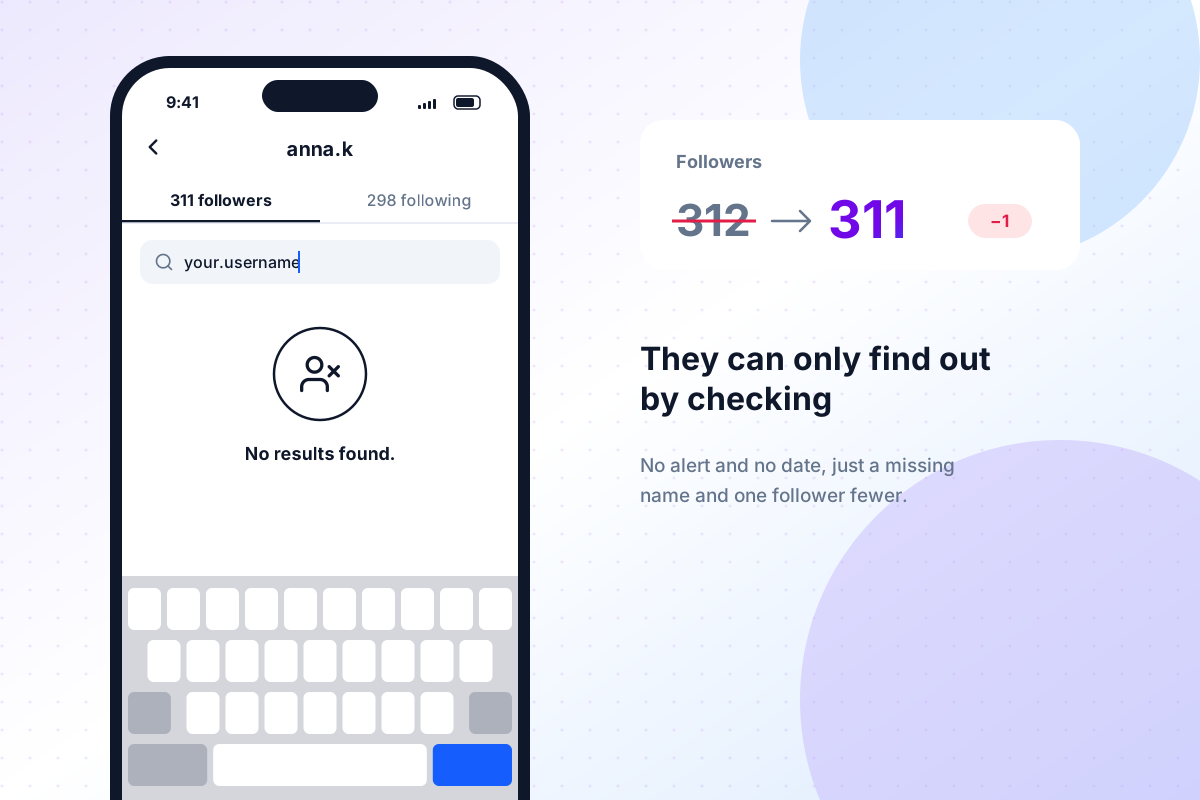
You can also check from their side. Open their profile, tap Following and search for your own username. This only works if their account is public or you follow them. If your name isn't there, they unfollowed you.
One catch: if their profile won't open at all or shows "User not found", they probably deactivated their account or blocked you. That's a different situation from an unfollow.
Checking by hand is fine for one name. It's useless when your count dropped by 12 and you have no idea who's missing. For that, skip ahead to the data export.
Can you see who follows you then unfollows on Instagram?
Not in the app. Instagram tells you when someone starts following you, but nothing tells you when they leave. They just quietly drop out of your list. So on Instagram, can you see who follows you then unfollows? Only if you keep track yourself.
The low-tech way is to write down new followers as they arrive (a note on your phone is enough) and check those names again a week or two later. Anyone missing followed you and then left. It works, but very few people keep it up for long.
How to check when someone unfollowed you is an even harder question. Instagram doesn't show a date for unfollows anywhere. The best you can do is narrow it down: if someone was in your followers on the 1st and gone on the 15th, they left somewhere in between. The more often you take a snapshot, the smaller that window gets.
Tools and apps to track unfollowers
There are plenty of "unfollower tracker" apps, and most of them want your Instagram username and password. We'd skip those. You're handing your login to a company you know nothing about, the automated activity can trigger Instagram's security checks or a temporary block, and the numbers are often off because Instagram limits what these apps can fetch.
There's a safer option built into Instagram itself: the data export. Every account can download a copy of its own data, and that file contains your full followers and following lists, including the date each person followed you.
That's what Followers Analyzer uses. You request the export from Instagram, upload the ZIP and see right away who isn't following you back. Everything is processed in your browser, so your lists never reach our servers. You can also save your followers as a CSV file and compare it with your next export to see exactly who left in between. The first analysis is free.
To get the export:
- In Instagram, open Accounts Center → Your information and permissions → Download your information.
- Tap Create export, pick your Instagram profile and choose Export to device.
- Under Customize information, select only Followers and following.
- Set the date range to All time and the format to JSON, then start the export.
- Instagram emails you when the file is ready. With just followers and following selected, it's usually quick.
For more ways to keep an eye on your followers, see our guide on how to see who unfollowed you on Instagram.
Emotional Impact of Being Unfollowed
Let's be real: it stings a little, especially when it's someone you know. It's a small thing, but it can feel like a tiny rejection, and nobody enjoys those. If it bothers you, that doesn't make you shallow. It makes you a person who uses social media.
It also helps to keep the scale in mind. An unfollow costs the other person one tap. They probably spent less than a second on it, and there's a good chance they don't even remember doing it.
Should I unfollow someone who unfollowed me on Instagram?
"Should I unfollow someone who unfollowed me on Instagram?" There's no rule, but here's how we'd think about it. Ask yourself two things:
- Do you actually enjoy their posts? If yes, keep following. Your feed is for you, not a scoreboard.
- Will you see this person in real life? If it's a coworker, a cousin or a friend of a friend, unfollowing back can turn a non-event into "a thing". If it's someone you'll never meet, it doesn't matter either way.
If you mostly just don't want to see their stuff anymore, there's a quieter option: mute them. Their posts and stories disappear from your feed, you still follow them, and nobody notices a thing.
What we'd avoid is unfollowing back purely to even the score. That feels good for about five minutes.
Dealing with feelings of rejection
If one particular unfollow keeps bugging you, a few things actually help:
- Look at who's still there. Open your last few posts and see who liked and commented. Those are the people paying attention.
- Don't build a story out of zero information. You don't know why they left. Maybe they're off Instagram during exams. Maybe they unfollowed 200 accounts in one go. Assuming the worst is a habit, not a fact.
- Talk to a friend, not the person. Saying "is it weird that so-and-so unfollowed me?" out loud usually makes it feel a lot smaller.
- Stop checking for a few days. Refreshing your followers list is the fastest way to make one unfollow take up a whole week.
Moving past the emotional response
At some point you have to decide whether this is information or just noise. One person leaving is noise. Twenty people leaving after the same post is information, and that's worth a closer look (next section).
Either way, your follower count goes up and down on its own, partly because of bots, deactivated accounts and other people's feed cleanups. Treating every change as a verdict on you is exhausting, and it isn't accurate.
Responding to the Unfollow
If you run a business or creator account, or you simply care about growing, unfollows can tell you something. Not one unfollow, though. A cluster of them.
Assessing your content and engagement
Start by looking for a pattern. If you have a professional account (creator or business, both are free to switch to), Insights shows your follows and unfollows by day. Check what you posted on the days with the biggest drops.
Things to look for:
- A topic switch. Did you post something very different from your usual content?
- A sales push. A week of promos, "follow these 5 accounts to win" giveaways or affiliate links often lines up with a dip.
- A posting spike. Did you suddenly post three times a day after months of posting once a week?
- Hot takes. Strong opinions on politics or online drama will lose some people. That can be a fair trade, just know you made it.
Also compare unfollows with engagement. If your follower count dipped but likes and comments held steady, you probably lost people who weren't watching anyway.
How to adjust your social media strategy
You don't need to reinvent anything. Small changes do most of the work:
- Keep a rhythm people can expect. Three posts a week, every week, beats ten posts one week and silence for a month.
- Space out promotions. If you're selling something, mix it with the kind of posts people originally followed you for.
- Try a different format before you drop a topic. Something that flopped as a photo dump might work as a short Reel or a carousel with one clear takeaway.
- Ask your followers. A poll sticker in your stories ("more of this or that?") takes ten seconds and gives you real answers instead of guesses.
Then give it a few weeks before you judge. Follower numbers are noisy from day to day.
Reaching out to them: Is it worth it?
For strangers, no. A DM asking "why did you unfollow me?" will feel strange to them, and you won't get a useful answer.
For a close friend, maybe, but only if you'd want to talk to them anyway. Keep it about the friendship, not the follow. "Hey, we haven't talked in ages, how are you?" works much better than "I noticed you unfollowed me." If something is actually wrong between you, it'll come up. If nothing is, you just caught up with a friend.
If it's an ex or someone you've drifted apart from, it's usually kinder to let it go. Sometimes an unfollow is just how people give themselves a bit of space.
Moving Forward
Tips for maintaining a positive Instagram presence
The accounts that shrug off unfollows best tend to have a few habits in common:
- They reply. Answering comments and DMs, even briefly, is the cheapest way to keep people around.
- They post what they'd want to see. If you're into what you post, it shows.
- They don't call out unfollowers. "If you unfollow me, don't bother coming back" posts don't keep anyone. They mostly make people uncomfortable.
- They check the numbers on a schedule. Once a week or once a month, not ten times a day.
The importance of focusing on genuine followers
A thousand followers who watch your stories are worth more than ten thousand who never see you. That's why a bot cleanup or a follow-for-follow unfollow isn't a real loss: those accounts were never part of your audience in the first place.
The people worth your attention are the ones who reply to your stories, send your posts to friends and show up in your comments by name. Learn their usernames and reply to them first. They're the reason running the account is fun.
Final thoughts on social media interactions
If someone unfollows you on Instagram, the useful moves are simple: confirm it, look for a pattern, decide whether this particular person matters to you, and then move on. Most unfollows are about the other person's feed, not your worth, and your follower count will keep wobbling no matter what you do.
And if you want to know exactly who isn't following you back, do it the safe way. Upload your Instagram data to Followers Analyzer. There's no login, and your data never leaves your browser.